November 27, 2025
An AI assistant can reason through a problem, but it can’t read your files, query your database or open a ticket on its own. Someone has to build that connection. The Model Context Protocol (MCP) gives AI apps and external systems one shared way to talk, so that work happens once.
Before MCP, every pairing of AI app and system needed its own connector. For example, five apps and five systems could mean 25 custom integrations. Each one had its own authentication, data format and upkeep. As a result, teams spent more time on glue code than on the product.
You will learn what MCP is, how its parts fit together and what a server can offer an AI app. You will also see how we used it in a real project and which security risks to check first. Even if you are not a developer, you can follow along.
What is the Model Context Protocol?
The Model Context Protocol (MCP) is an open standard for connecting AI applications to external tools, data and systems. A developer wraps a system in an MCP server once. After that, any MCP-compatible app, such as Claude, ChatGPT or VS Code, can discover and use it without custom integration code.
Anthropic introduced the Model Context Protocol as an open-source project in November 2024, and it now sits under the Linux Foundation. According to the Linux Foundation’s announcement, Claude, ChatGPT, Gemini, Microsoft Copilot, Cursor and VS Code all support MCP.
How the Model Context Protocol works
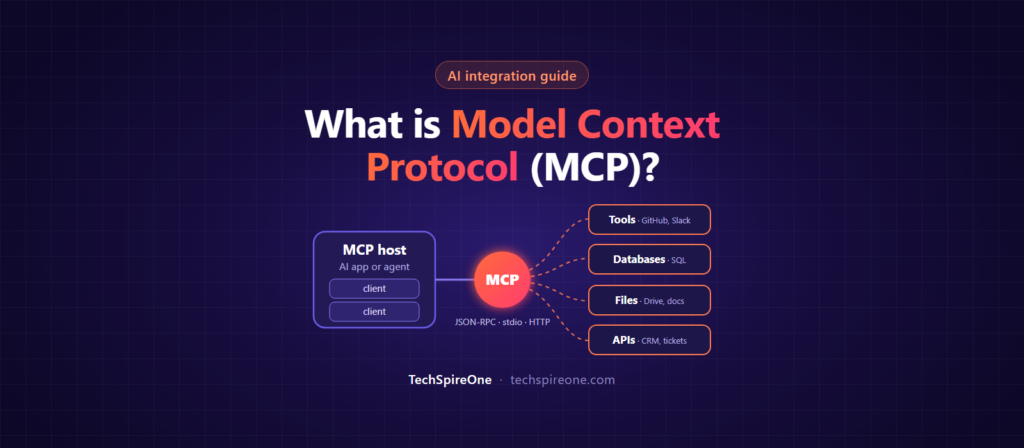
The Model Context Protocol uses a client-server design with three roles. The host is the AI app you use, each client inside it connects to one server, and each server exposes tools, data or prompts. They exchange JSON-RPC messages over a transport such as stdio or Streamable HTTP.
| Role | What it is | Example |
|---|---|---|
| Host | The AI application you interact with | A chat assistant, coding agent or IDE |
| Client | A connector inside the host that talks to one server | The host’s connection to a GitHub server |
| Server | A program that exposes tools, data or prompts | A GitHub, Postgres or Slack MCP server |
Overall, the host coordinates everything. It creates the clients, talks to the AI model and combines context from each server. For example, a host connected to three servers runs three clients. The MCP architecture specification also keeps servers isolated, so a server shouldn’t see the whole conversation or look into other servers.
Transports: stdio and Streamable HTTP
A transport is how Model Context Protocol messages travel between client and server. The MCP transport specification defines two options:
- stdio. The client starts the server as a local process and talks over standard input and output. It’s the simplest choice for local tools.
- Streamable HTTP. The client sends HTTP requests to one endpoint, and the server replies with JSON or streams results. This is the option for remote, hosted servers.
One recent change matters here. The 2026-07-28 spec revision made MCP stateless, so each request carries its own context. As a result, remote MCP servers can now scale behind an ordinary load balancer, like any web service.
What can an MCP server expose?
An MCP server can expose three core primitives: tools, resources and prompts. Tools are actions the AI model can call, resources are data the application reads for context, and prompts are reusable templates the user picks. The main difference between them is who decides when each one gets used.
| Primitive | What it does | Who controls it | Example |
|---|---|---|---|
| Tools | Actions the AI model can take | The model | Run a database query, create a GitHub issue |
| Resources | Context data for the AI app | The application | A file’s contents, a database schema |
| Prompts | Reusable interaction templates | The user | A slash command such as “summarize this PR” |
For example, the MCP server concepts guide describes a database server that uses all three. A query tool lets the model run searches. Meanwhile, a resource holds the schema, and a prompt shows how to use the tools well.
In practice, tools do most of the work. However, resources and prompts are worth adding when they help.
A schema resource gives the model context before it writes a query. Similarly, a prompt gives users a shortcut for a task they repeat often. In other words, a good Model Context Protocol server gives the model exactly what it needs and nothing more.
MCP in practice: how we used it in Prism AI
MCP servers can wrap almost any system with an API. For example:
- Coding assistants. A GitHub server lets a coding agent read issues, browse code and work with pull requests.
- Database questions in plain language. A Postgres server exposes the schema and a query tool, so you can ask about your data without writing SQL.
- Internal knowledge search. Servers for Google Drive or Slack let an assistant pull in documents when it answers questions.
At TechSpireOne, we used the Model Context Protocol in Prism AI, a demo platform for a knowledge-base AI system. A single LangGraph agent answers questions across internal documents, business databases, Google Drive files and web search.
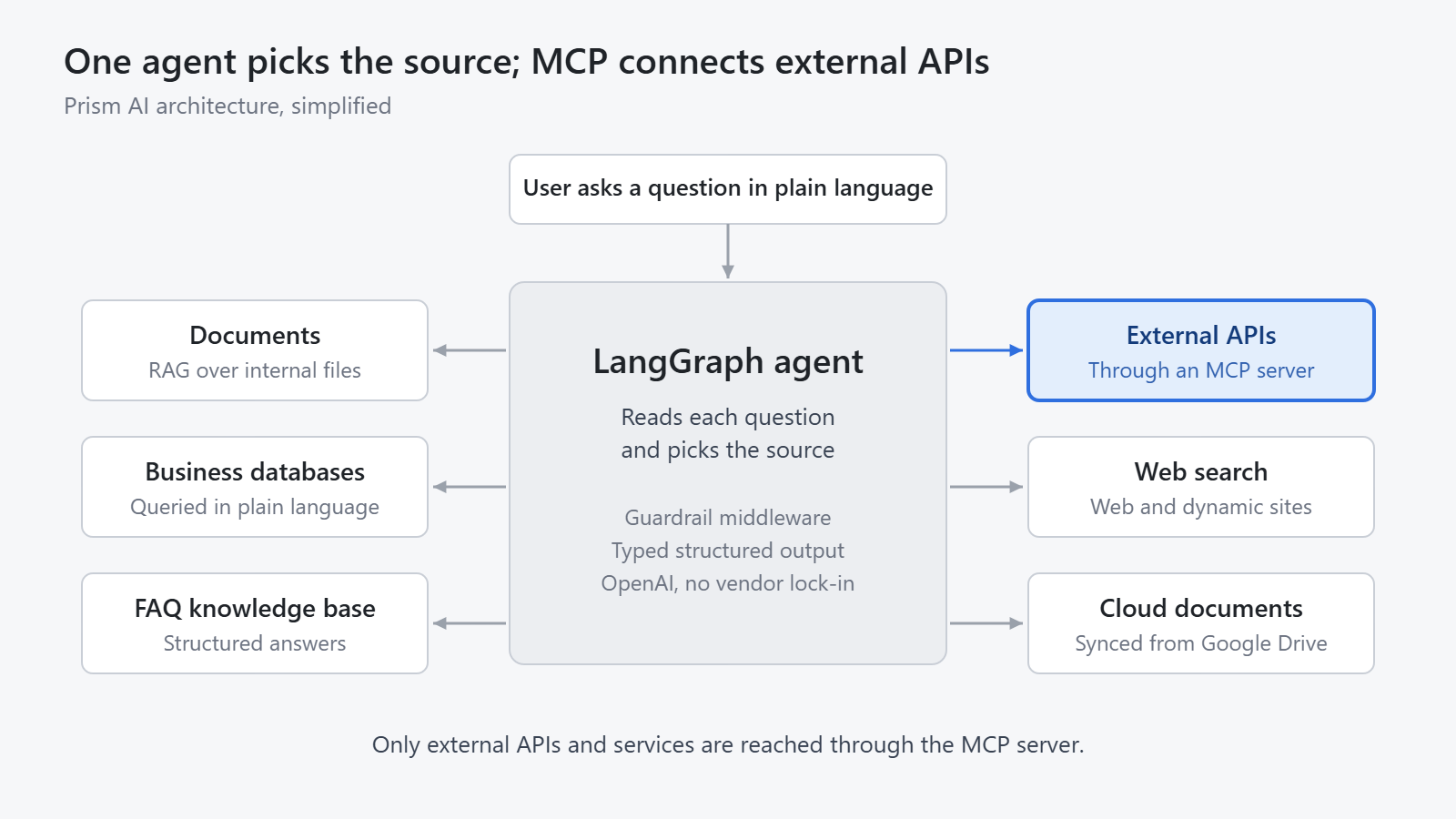
External APIs reach the agent through an MCP server, which keeps the API integration work in one place. Instead of hard-coding each API, the server describes its tools in a standard format. Consequently, adding a new service means updating the server, not rewriting the agent.
The rest of the stack is a standard retrieval setup, with PostgreSQL and pgvector for vector search. If that’s new to you, our explainer on how embeddings power semantic search covers the basics. The lesson for AI agent development is simple. Keep reasoning in the agent, and keep integrations in MCP servers.
Security risks to check before you connect an MCP server
The Model Context Protocol defines how to connect, but it doesn’t decide what’s safe to connect. Three risks deserve your attention:
- Tool poisoning. An attacker hides instructions in a tool’s description, a form of indirect prompt injection. A 2026 threat-modeling study of MCP ranked it the most prevalent client-side vulnerability. It also found that most clients it tested accept tool descriptions without rigorous checks.
- Rug pulls. A server changes a tool’s definition after you approve it. As a result, a tool that looked safe on day one can behave differently later.
- Ordinary bugs. After all, an MCP server is still code. If it trusts its input blindly, it can be open to command injection.
None of these risks is unique to the Model Context Protocol. However, MCP makes it easy to connect many servers quickly, so a weak review process scales just as fast as the integrations do.
To reduce the risk:
- Install servers only from publishers you trust, and review them like any other dependency.
- Give each server the minimum permissions and credentials it needs.
- Read the tool definitions before you approve a server, and again when they change.
- Require human approval for anything that writes, deletes or sends data. The OWASP MCP Security Cheat Sheet also advises against auto-approving tool calls.
Key takeaways
- The Model Context Protocol gives AI apps one standard way to reach tools and data. Build a server once, and any compatible host can use it.
- Each server exposes tools, resources and prompts, and the host keeps servers isolated from each other.
- Treat every MCP server like code you run. In other words, keep a human in the loop for anything that writes data.
If you’re planning MCP server development or a wider AI automation project, TechSpireOne designs and builds AI agents, RAG systems and MCP integrations. You can also browse our past projects to see the kind of systems we build.
If you’re connecting your first MCP server and want a second pair of eyes on the architecture, you can talk to the TechSpireOne team about your project.